技能清单
C#基础知识
https://www.yuque.com/ysgstudyhard/da6e0c/sfym98
面向对象的开发思想 —— 封装、继承、多态
什么是面向对象?
面向对象(Object Oriented Programming),即面向对象编程,它是相对于面向过程来说的。
它可能包含数据、属性、代码与方法。对象则指的是类的实例。它将对象作为程序的基本单元,将程序和数据封装其中,以提高软件的重用性、灵活性和扩展性,对象里的程序可以访问及经常修改对象相关连的数据。在面向对象程序编程里,计算机程序会被设计成彼此相关的对象。
封装
封装从字面上来理解就是包装的意思,专业点就是信息隐藏,是指利用抽象数据类型将数据和基于数据的操作封装在一起,使其构成一个不可分割的独立实体,数据被保护在抽象数据类型的内部,尽可能地隐藏内部的细节,只保留一些对外接口使之与外部发生联系。系统的其他对象只能通过包裹在数据外面的已经授权的操作来与这个封装的对象进行交流和交互。也就是说用户是无需知道对象内部的细节,但可以通过该对象对外的提供的接口来访问该对象。
封装的优点
1、良好的封装能够减少耦合。
2、类内部的结构可以自由修改。
3、可以对成员进行更精确的控制。
4、隐藏信息,实现细节。
继承
继承是使用已存在的类的定义作为基础建立新类的技术,新类的定义可以增加新的数据或新的功能,也可以用父类的功能。通过使用继承我们能够非常方便地复用以前的代码,能够大大的提高开发的效率。
继承的优点
1、减少冗余代码,提高代码的复用。
2、合理使用,大大提高开发效率。
继承的缺陷
1、父类变,子类就必须变。
2、继承破坏了封装,对于父类而言,它的实现细节对与子类来说都是透明的。
3、继承是一种强耦合关系。
多态
多态同一个行为具有多个不同表现形式或形态的能力。是指一个类实例(对象)的相同方法在不同情形有不同表现形式。多态机制使具有不同内部结构的对象可以共享相同的外部接口。这意味着,虽然针对不同对象的具体操作不同,但通过一个公共的类,它们(那些操作)可以通过相同的方式予以调用。
多态的优点:
- \1. 消除类型之间的耦合关系
- \2. 可替换性
- \3. 可扩充性
- \4. 接口性
- \5. 灵活性
- \6. 简化性
多态存在的三个必要条件:
- 继承
- 重写(子类继承父类后对父类方法进行重新定义)
- 父类引用指向子类对象
五大基本原则(SOLID)
1、单一职责原则(SRP)
一个类应该有且只有一个去改变它的理由,这意味着一个类应该只有一项工作。
指的是一个类或者一个方法只做一件事。如果一个类承担的职责过多,就等于把这些职责耦合在一起,一个职责的变化就可能抑制或者削弱这个类完成其他职责的能力。例如餐厅服务员负责把订单给厨师去做,而不是服务员又要订单又要炒菜。
2、开放封闭原则(OCP)
对象或实体应该对扩展开放,对修改封闭。
更改封闭即是在我们对模块进行扩展时,勿需对源有程序代码和DLL进行修改或重新编译文件!这个原则对我们在设计类的时候很有帮助,坚持这个原则就必须尽量考虑接口封装,抽象机制和多态技术。
3、里氏替换原则(LSP)
所有基类出现的地方都可以用派生类替换而不会程序产生错误。子类可以扩展父类的功能,但不能改变父类原有的功能。 例如机动车必须有轮胎和发动机,子类宝马和奔驰不应该改写没轮胎或者没发动机。
4、接口隔离原则(ISP)
类不应该依赖不需要的接口,知道越少越好。例如电话接口只约束接电话和挂电话,不需要让依赖者知道还有通讯录。
5、依赖倒置原则(DIP)
高层次的模块不应该依赖于低层次的模块,他们都应该依赖于抽象。具体实现应该依赖于抽象,而不是抽象依赖于实现。
指的是高级模块不应该依赖低级模块,而是依赖抽象。抽象不能依赖细节,细节要依赖抽象。比如类A内有类B对象,称为类A依赖类B,但是不应该这样做,而是选择类A去依赖抽象。例如垃圾收集器不管垃圾是什么类型,要是垃圾就行。
WPF、.Net Core
https://www.yuque.com/ysgstudyhard/da6e0c/ta46y9
SqlServer、MySQL
https://www.yuque.com/ysgstudyhard/da6e0c/tfeyub
B/S、C/S
- B/S 即 Browser-Server 架构。用了浏览器代替了传统的客户端,优点在于可以跨平台使用。Windows、Linux、Mac 只要有浏览器(和网)就行。但是在功能上就会受限于浏览器,比如跨域问题以及本地文件访问问题,并且程序的性能也依赖于浏览器。
- C/S 即 Client-Server 架构。传统的架构,对平台有限制,但优点在于可以调用本地资源(权限比较大)。
寸金游( 后端开发 )
ASP.NET Core
ASP.NET
ASP.NET(这里指的是ASP.NET 4.x以下版本)是由 Microsoft 创建的开放源代码 Web 框架,助你使用 .NET 生成现代 Web 应用和服务。是一个成熟的框架,提供在 Windows 上生成基于服务器的企业级 Web 应用所需的服务。
ASP.NET Core
ASP.NET Core是一个开源,跨平台的(window、Linux、MacOs、Android、IOS等多个平台),高性能的框架。使用起来更精简、更容易配置、更加模块化、可扩展性更强。
ASP.NET Core 具有如下优点:
- 生成 Web UI 和 Web API 的统一场景。
- 针对可测试性进行构建。
- Razor Pages 可以使基于页面的编码方式更简单高效。
- Blazor 允许在浏览器中使用 C# 和 JavaScript。 共享全部使用 .NET 编写的服务器端和客户端应用逻辑。
- 能够在 Windows、macOS 和 Linux 上进行开发和运行。
- 开放源代码和以社区为中心。
- 集成新式客户端框架和开发工作流。
- 支持使用 gRPC 托管远程过程调用 (RPC)。
- 基于环境的云就绪配置系统。
- 内置依赖项注入。
- 轻型的高性能模块化 HTTP 请求管道。
- 能够托管于以下各项:
- 并行版本控制。
- 简化新式 Web 开发的工具。
ASP.NET Core MVC
MVC编程模式
首先MVC全名是Model(模型)-View(试图)-Controller(控制器),是一种软件设计典范。
用一种业务逻辑、数据、界面显示分离的方法组织代码,将业务逻辑聚集到一个部件里面。各部分相互独立并且相互联系,可以让各自专注于自己的业务。
ASP.NET Core MVC
ASP.NET MVC 在服务器上呈现 UI,并使用模型-视图-控制器 (MVC) 结构模式。 MVC 模式将应用分成三组主要组件:模型、视图和控制器
用户请求被路由到控制器, 控制器负责使用模型来执行用户操作或检索查询结果,控制器选择要显示给用户的视图,并为其提供所需的任何模型数据。 对 Razor Pages 的支持是建立在 ASP.NET Core MVC 基础之上的。
使用视图的好处
视图可帮助在 MVC 应用内建立关注点分离,方法是分隔用户界面标记与应用的其他部分。 采用 SoC 设计可使应用模块化,从而提供以下几个好处:
- 应用组织地更好,因此更易于维护。 视图一般按应用功能进行分组。 这使得在处理功能时更容易找到相关的视图。
- 应用的若干部分是松散耦合的。 可以生成和更新独立于业务逻辑和数据访问组件的应用视图。 可以修改应用的视图,而不必更新应用的其他部分。
- 因为视图是独立的单元,所以更容易测试应用的用户界面部分。
- 由于应用组织得更好,因此你不太可能会意外重复用户界面的各个部分。
将数据传递给视图的几种方式?
- 强类型数据:viewmodel
- 弱类型数据
- ViewData (ViewDataAttribute)
- ViewBag
RESTful风格
RESTful的基本特点
- 无状态
- 面向“资源”
- 使用HTTP的动词
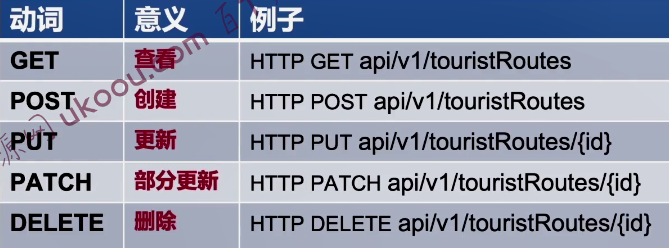
- HATOAS超媒体即应用状态引擎
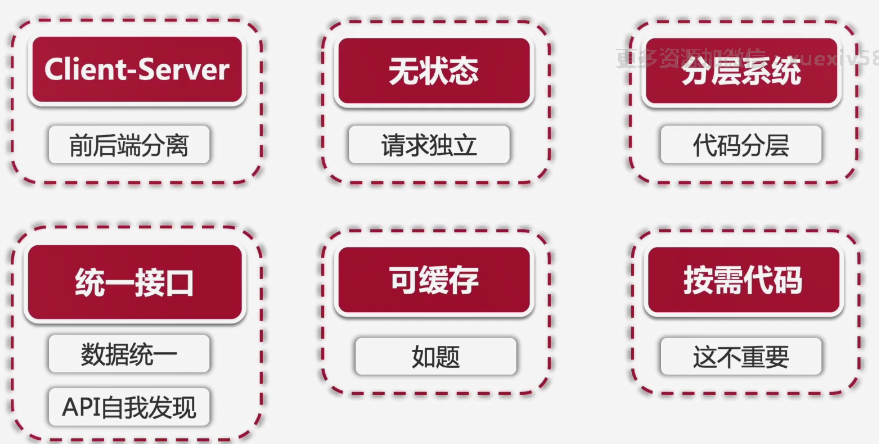
RESTful的6个约束
6个约束限制
Entity Framework
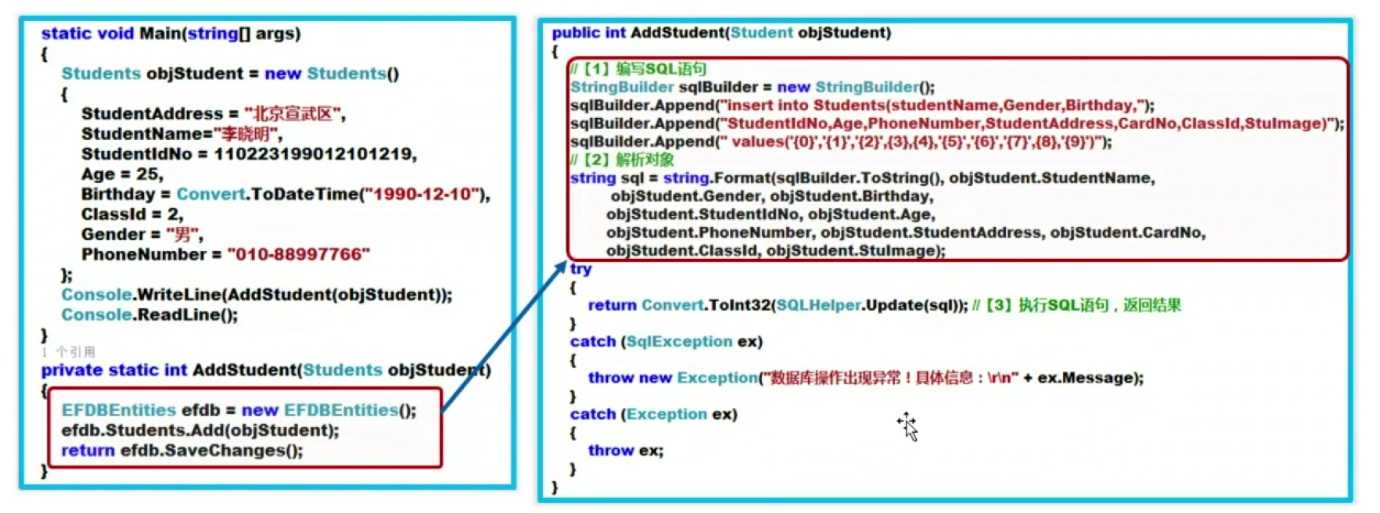
- Entity Framework是一个对象关系映射ORM框架。
- 开发人员使用Linq语言,对数据库操作如同操作Object对象。
- EF有三种使用场景,1. 从数据库生成Class,2.由实体类生成数据库表结构,3.通过数据库可视化设计器设计数据库,同时生成实体类。
- 以前是使用ADO.NET来进行对数据库中得数据表进行操作,现在,使用ORM直接对对象进行操作,操作对象就等于操作数据库表。
数据库映射工具AppDbContext
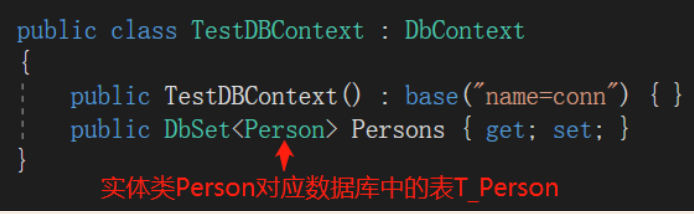
DbContext是实体类和数据库之间的桥梁,DbContext主要负责与数据交互。
1、DbContext包含所有的实体映射到数据库表的实体集(DbSet < TEntity >)。
2、DbContext 将LINQ-to-Entities查询转换为SQL查询并将其发送到数据库。
3、更改跟踪: 它跟踪每个实体从数据库中查询出来后发生的修改变化。
4、持久化数据: 它也基于实体状态执行插入、更新和删除操作到数据库中。
DbContext中的DbSet
DbSet表示上下文中指定类型的所有实体的集合或可从数据库中查询的指定类型的所有实体的集合。
OnModelCreating
.gif) | OnModelCreating | 在完成对派生上下文的模型的初始化后,并在该模型已锁定并用于初始化上下文之前,将调用此方法。虽然此方法的默认实现不执行任何操作,但可在派生类中重写此方法,这样便能在锁定模型之前对其进行进一步的配置。 |
|---|
Postman
Postman是一种接口调试与http接口测试的工具。我们可以非常方便的用来模拟get或者post或者其他方式的请求来调试和测试接口。
Postman 的优点
- 支持各种的请求类型: get、post、put、patch、delete 等
- 支持在线存储数据,通过账号就可以进行迁移数据
- 支持用例导出、导入、批量运行
- 很方便的支持请求 header 和请求参数的设置
- 支持不同的认证机制,包括 Basic Auth,Digest Auth,OAuth 1.0,OAuth 2.0 等
- 响应数据是自动按照语法格式高亮的,包括 HTML、JSON 、XML和文本
C#的异步方法async/await
异步编程
使用异步编程,可以提高响应能力(吞吐量),即使用异步方式在同一时间可以处理更多的请求。
使用同步方式,线程会被耗时操作一直占用,直到耗时操作结束;使用异步方式,程序走到await关键字会立即return,释放线程,剩下的代码将放到一个回调(Task.GetAwaiter()的UnsafeOnCompleted(Action)),耗时操作完成时才会回调执行。
异步方法
- 指程序调用某个方法的时候,不做任何等待等待,在处理完成之前就返回该方法,继续执行接下来的操作。
异步方法是什么?
- 函数在执行完成前就可以先返回调用方,然后继续执行接下来的逻辑完成任务的函数。
代码示例

异步控制的流程
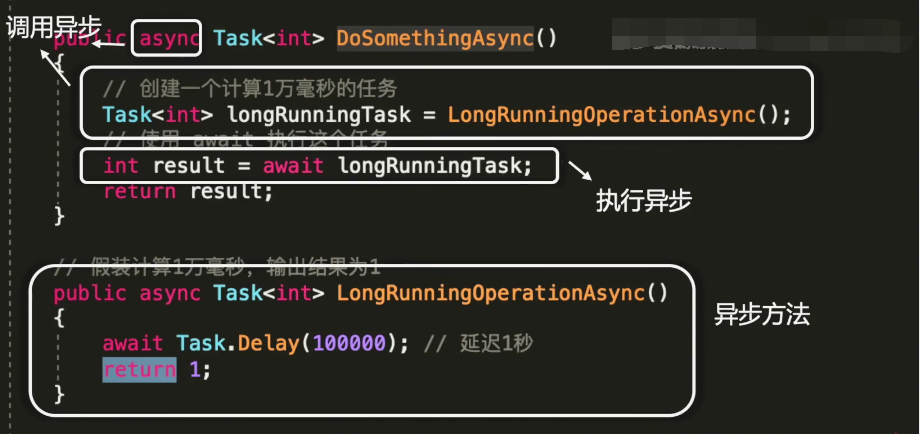
在函数声明中使用async关键词的意义是什么呢?

总结

JWT实现无状态登录
JWT是干什么用的?
- JSON Web Token
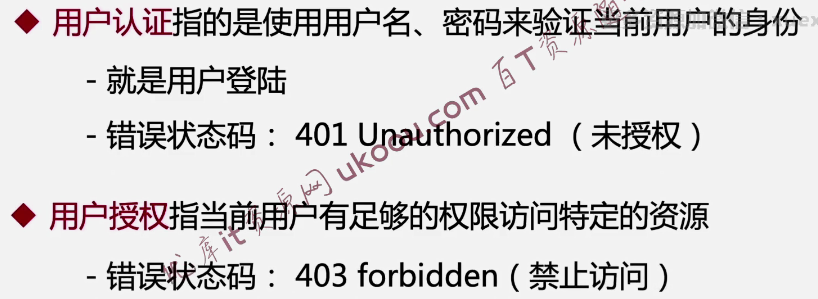
- JWT的作用是用户授权(Athorization),而不是用户的身份认证(Authentication)。
授权 ?认证
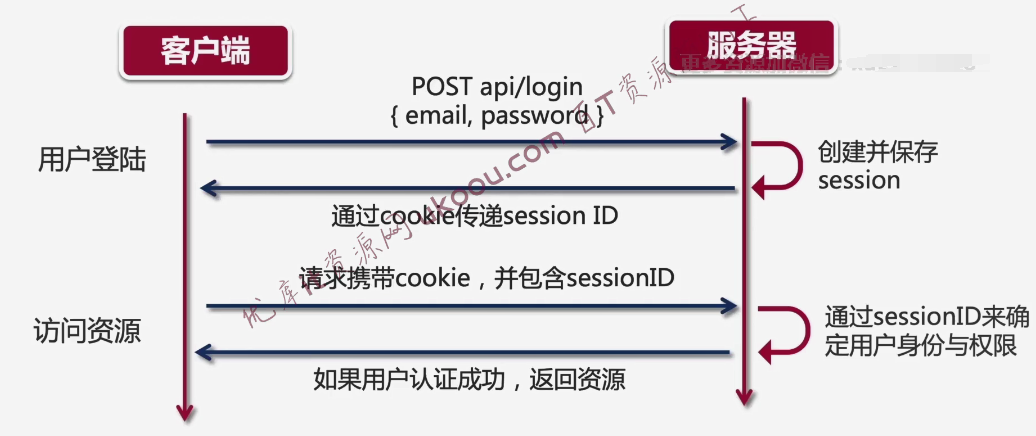
传统的Session登录
- 用户登录后,服务器会保存登陆的session信息。
- Session ID会通过cookie传递给前端。
- http请求会附带cookie。
- 有状态登录。
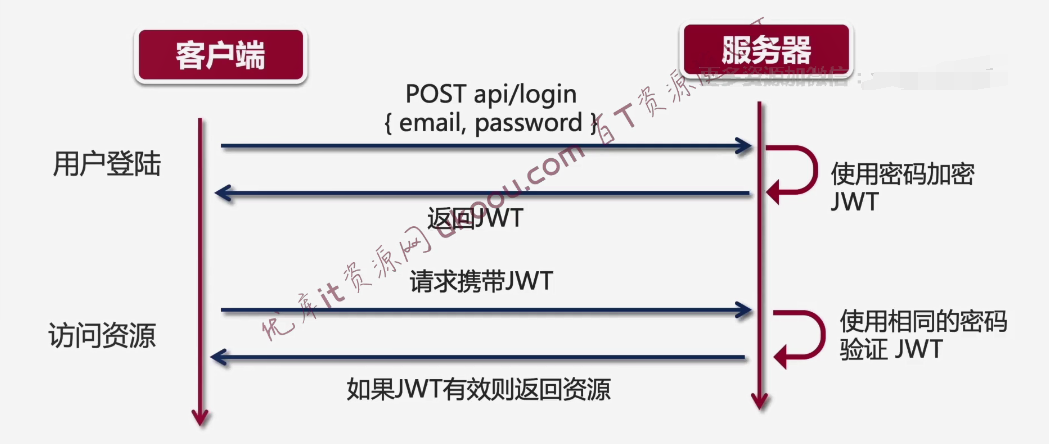
JWT彻底改变了用户授权与认证的过程
- 替换cookie
- JWT信息只需要保存在客户端
- 无状态登录
有状态登录 ?无状态登录
有状态登录(session)
无状态登录(JWT)
有状态登录 ?无状态登录
- Session需要保存在服务器上,而Session则保存在cookie中。
- JWT信息只需要保存在客户端。
- 无状态登陆优势∶分布式部署。
JWT的原理
- JWT 的原理是,服务器认证以后,生成一个 JSON 对象,发回给用户,就像下面这样。
- { "姓名": "张三", "角色": "管理员", "到期时间": "2018年7月1日0点0分" }
- 以后,用户与服务端通信的时候,都要发回这个 JSON 对象。服务器完全只靠这个对象认定用户身份。
- 为了防止用户篡改数据,服务器在生成这个对象的时候,会加上签名。
- 服务器就不保存任何 session 数据了,也就是说,服务器变成无状态了,从而比较容易实现扩展。
区别
- session 存储在服务端占用服务器资源,而 JWT 存储在客户端。
- session 存储在 Cookie 中,存在伪造跨站请求伪造攻击的风险。
- session 只存在一台服务器上,那么下次请求就必须请求这台服务器,不利于分布式应用。
- 存储在客户端的 JWT 比存储在服务端的 session 更具有扩展性。
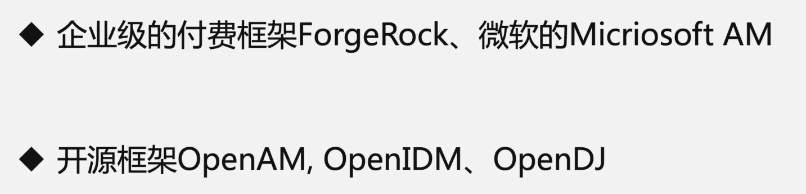
常用的单点登录(SSO)系统
JWT的优点
- 无状态,简单、方便,完美支持分布式部署。
- 非对称加密,Token安全性高。
JWT的缺点
- 无状态,token一经发布则无法取消。(无解)
- 明文传递,Token安全性低。(使用Https即可解决)
基于声明(Claims)的身份认证体系
Claim
- 资源的所有权。
- 表述用户的身份、说明用户的角色、表示用户所具有的权限。
- 最小不可分割单位,使用的灵活度相当高,可以自由组合。
在开发网站的时候
- 验证与授权完全分开。
- 使用的是基于Claims的身份认证体系。
- JWT只是Claim的其中一种应用方式而已。
PaginationList类来实现数据分页
分页组件类:PaginationList <T>
Helper - PaginationList.cs
x1namespace _04NET___CJ_ASP_Travel4.Helper2{3 public class PaginationList<T> : List<T>4 {5 public int CurrentPage { get; set; }6 public int PageSize { get; set; }7
8 public PaginationList(int currentPage, int pageSize, List<T> items)9 {10 CurrentPage = currentPage;11 PageSize = pageSize;12 AddRange(items);13 }14
15 public static async Task<PaginationList<T>> CreateAsync(16 int currentPage, int pageSize, IQueryable<T> result)17 {18 // pagination19 // skip20 var skip = (currentPage - 1) * pageSize;21 result = result.Skip(skip);22 // 以pagesize为标准显示一定量的数据23 result = result.Take(pageSize);24
25 // include vs join26 var items = await result.ToListAsync();27
28 return new PaginationList<T>(currentPage, pageSize, items);29 }30 }31}属性映射服务PropertyMappingService实现请求数据的动态排序
- 通过字符串“ desc”来判断升序还是降序
- 删除升序或降序字符串 " asc" or " desc"来获得属性的名称
新建PropertyMappingService.cs
xxxxxxxxxx401namespace _04NET___CJ_ASP_Travel4.Services2{3    public class PropertyMappingService : IPropertyMappingService4    {5        private Dictionary<string, PropertyMappingValue> _touristRoutePropertyMapping =6           new Dictionary<string, PropertyMappingValue>(StringComparer.OrdinalIgnoreCase)7           {8               { "Id", new PropertyMappingValue(new List<string>(){ "Id" }) },9               { "Title", new PropertyMappingValue(new List<string>(){ "Title" })},10               { "Rating", new PropertyMappingValue(new List<string>(){ "Rating" })},11               { "OriginalPrice", new PropertyMappingValue(new List<string>(){ "OriginalPrice" })},12           };13
14        private IList<IPropertyMapping> _propertyMappings = new List<IPropertyMapping>();15
16        public PropertyMappingService()17        {18            _propertyMappings.Add(19                new PropertyMapping<TouristRouteDto, TouristRoute>(20                    _touristRoutePropertyMapping));21        }22
23        public Dictionary<string, PropertyMappingValue>24            GetPropertyMapping<TSource, TDestination>()25        {26            // 获得匹配的映射对象27            var matchingMapping =28                _propertyMappings.OfType<PropertyMapping<TSource, TDestination>>();29
30            if (matchingMapping.Count() == 1)31            {32                return matchingMapping.First()._mappingDictionary;33            }34
35            throw new Exception(36                $"Cannot find exact property mapping instance for <{typeof(TSource)},{typeof(TDestination)}");37
38        }39    }40}
新建PropertyMappingValue.cs
xxxxxxxxxx111namespace _04NET___CJ_ASP_Travel4.Services2{3 public class PropertyMappingValue4 {5 public IEnumerable<string> DestinationProperties { get; private set; }6 public PropertyMappingValue(IEnumerable<string> destinationProperties)7 {8 DestinationProperties = destinationProperties;9 }10 }11}新建PropertyMapping.cs
xxxxxxxxxx121namespace _04NET___CJ_ASP_Travel4.Services2{3    public class PropertyMapping<TSource, TDestination> : IPropertyMapping4    {5        public Dictionary<string, PropertyMappingValue> _mappingDictionary { get; set; }6
7        public PropertyMapping(Dictionary<string, PropertyMappingValue> mappingDictionary)8        {9            _mappingDictionary = mappingDictionary;10        }11    }12}
新增接口IPropertyMapping.cs
xxxxxxxxxx61namespace _04NET___CJ_ASP_Travel4.Services2{3 public interface IPropertyMapping4 {5 }6}新增接口IPropertyMappingService.cs
xxxxxxxxxx71namespace _04NET___CJ_ASP_Travel4.Services2{3 public interface IPropertyMappingService4 {5 Dictionary<string, PropertyMappingValue> GetPropertyMapping<TSource, TDestination>();6 }7}注册依赖服务(Startup.cs)ConfigureServices
xxxxxxxxxx11 services.AddTransient<IPropertyMappingService, PropertyMappingService>();映射字典
注入属性映射服务依赖TouristRouteRepository.cs
xxxxxxxxxx181        private readonly IPropertyMappingService _propertyMappingService;2
3        public TouristRouteRepository(4            AppDbContext appDbContext,5            IPropertyMappingService propertyMappingService6        )7        {8            _context = appDbContext;9            _propertyMappingService = propertyMappingService;10        }11
12            if (!string.IsNullOrWhiteSpace(orderBy))13            {14                var touristRouteMappingDictionary = _propertyMappingService15                    .GetPropertyMapping<TouristRouteDto, TouristRoute>();16
17                result = result.ApplySort(orderBy, touristRouteMappingDictionary);18            }
新建Helper - IQueryableExtensions.cs
xxxxxxxxxx671namespace _04NET___CJ_ASP_Travel4.Helper2{3    public static class IQueryableExtensions4    {5        public static IQueryable<T> ApplySort<T>(6            this IQueryable<T> source,7            string orderBy,8            Dictionary<string, PropertyMappingValue> mappingDictionary9        )10        {11            if (source == null)12            {13                throw new ArgumentNullException("source");14            }15
16            if (mappingDictionary == null)17            {18                throw new ArgumentNullException("mappingDictionary");19            }20
21            if (string.IsNullOrWhiteSpace(orderBy))22            {23                return source;24            }25
26            var orderByString = string.Empty;27
28            var orderByAfterSplit = orderBy.Split(',');29
30            foreach(var order in orderByAfterSplit)31            {32                var trimmedOrder = order.Trim();33
34                // 通过字符串“ desc”来判断升序还是降序35                var orderDescending = trimmedOrder.EndsWith(" desc");36
37                // 删除升序或降序字符串 " asc" or " desc"来获得属性的名称38                var indexOfFirstSpace = trimmedOrder.IndexOf(" ");39                var propertyName = indexOfFirstSpace == -140                    ? trimmedOrder41                    : trimmedOrder.Remove(indexOfFirstSpace);42
43                if (!mappingDictionary.ContainsKey(propertyName))44                {45                    throw new ArgumentException($"Key mapping for {propertyName} is missing");46                }47
48                var propertyMappingValue = mappingDictionary[propertyName];49                if (propertyMappingValue == null)50                {51                    throw new ArgumentNullException("propertyMappingValue");52                }53
54                foreach(var destinationProperty in 55                    propertyMappingValue.DestinationProperties.Reverse())56                {57                    // 给IQueryable 添加排序字符串58                    orderByString = orderByString +59                        (string.IsNullOrWhiteSpace(orderByString) ? string.Empty : ", ")60                        + destinationProperty61                        + (orderDescending ? " descending" : " ascending");62                }63            }64            return source.OrderBy(orderByString);65        }66    }67}
客户预约管理系统
WPF框架
WPF 是微软推出的表现层UI开发框架,全称 Windows Presentation Foundation。 相对Winform来讲,它使用一种全新的桌面应用程序 UI 的开发方式。
简而言之,可以使用 WPF 完成以下操作:
- 绘制普通控件和图形。
- 轻松加载/播放音频和视频文件。
- 提供平滑的图形效果,例如阴影和颜色渐变。
- 使用可跨相同控件使用的共享样式,以提供相同的主题、皮肤和设计。
- 变换对象,包括形状、控件和视频。
- 可以创建和动画 3D 图形。
- 可以轻松绘制可缩放的矢量图形而不会出现锯齿状锯齿。
XAML
XAML 是用来组织 WPF UI 的 XML 文件。 以XML标签方式表示UI的重点是编写一次可以在其他地方运行它,比如Blend软件也能正常加载与编辑。
XAML 不仅仅适用于 WPF。 XAML 是一种基于 XML 的语言,它有多种变体。
WPF 中的资源是什么?
资源提供了一种简单的方法来重用已定义的对象和值。 WPF 中的资源允许一次设置多个控件的属性。 例如,可以使用单个资源在 WPF 应用程序中的多个元素上设置背景属性。
定义资源的最佳方式是在 Window 或 Page 元素级别。 为元素定义的任何资源也适用于该元素的子元素。
WPF中的Visibility.Collapsed和Visibility.Hidden有什么区别?
- Visibility.Hidden 隐藏控件,但保留它在布局中占用的空间。 所以它呈现空白而不是控件。
- Visibilty.Collapsed 不呈现控件并且不保留空格。 控件占用的空间是“折叠的”
什么是静态资源和动态资源?
- Static Resource - StaticResource 的值在加载时确定
- Dynamic Resource - 在运行时更改属性值的情况下使用。
WPF控件可以分为四类:
- Control: 大部分时间使用的基本控件。 例如文本框、按钮等。像按钮、文本框、标签等独立控件的控件被称为内容控件。 还有其他控件可以容纳其他控件,例如 itemscontrols。 Itemscontrol 可以有多个文本框控件、标签控件等。
- Shape: - 帮助我们创建简单的图形控件,如椭圆、线条、矩形等。
- Panel: - 有助于对齐和定位控件。 例如,grid 帮助我们以表格方式对齐,stack panel 有助于水平和垂直对齐。
- Content presenter: - 用于将任何 XAML 内容放入其中。
XML 和 XAML 之间的区别:
- 所有 XAML 文档都可以称之为 XML 文档。 然而,反过来说却是不能的。
- XAML 是一种声明性应用程序语言,而 XML 是一种标记语言。
- XML 主要用于 Web 应用程序。 相比之下,XAML 用于设计 Windows 和其他 Web 应用程序的控件。
- XAML 侧重于对象属性、定义以及它们之间的关系。
- XML 是 W3C 产生的一种标记语言,用于描述其他标记语言。
WPF中的xmlns 和xmlns:x有什么区别?
这两个命名空间都有助于定义/解析 XAML UI 元素。
- 第一个命名空间是默认命名空间,有助于解析整体 WPF 元素。
- 第二个命名空间以“x:”为前缀,有助于解析 XAML 语言定义。
相对于Winform,WPF有什么优势?
- 1 - 绑定(更简约的编码)
- 2 - 灵活的外观和感受(资源和样式)
- 3 - 声明式编程 (XAML)
- 4 - 表现层混合动画(动画开发简单)
- 5 - 快速加载(硬件加速)
- 6- 图形硬件无关(分辨率无关)
WPF对象完整的层次结构?
- Object: 由于 WPF 是使用 .NET 创建的,因此 WPF UI 类继承的第一个类是 .NET 对象类。
- Dispatcher: 一个抽象基类,用于绑定到一个线程上的类。与Windows窗体类似,WPF也要求仅从创建线程中调用方法和属性。WPF应用程序使用为人熟知的单线程亲和(Single-Thread Affinity,STA)模型,这意味着整个用户界面由单个线程拥有。从另一个线程与用户界面进行交互是不安全的。通过继承自DispathcerObject类,用户界面中的每个元素都可以检查代码是否在正确的线程上运行,并能通过访问调度程序为用户界面线程封送代码。
- Dependency: 所有支持依赖属性的类的基类。依赖属性可以依赖其他输入,例如主题和用户喜好。依赖属性与数据绑定,动画,资源和样式一起使用。
- Visual: 所有可见元素的基类都是Visual。这个类包含点击测试和转换等特性
- UI Element: 所有需要基本显示功能的WPF元素的抽象基类是UIElement。这个类提供了鼠标移动,拖放,按键的通道和起泡事件;提供了可以由派生类重写的虚显示方法;以及布局方法。WPF不再使用Window句柄,这个类就可以用Window句柄
- FrameworkElement: FrameworkElement派生自基类UIElement,实现了由基类定义的方法的默认代码
- 最后,所有 WPF 控件 textbox 、 button 、 grids 以及可以从 WPF 工具箱中想到的任何内容都继承自FrameworkElement类。
MVVM设计
什么是MVVM?
MVVM(Model View ViewModel)是一个在WPF中制作应用的框架。 MVVM 与 MVC 框架相同。 它是一个三层架构,我们可以使用 MVVM 进行松耦合开发。
MVVM中的 View 和 ViewModel?
- View是客户端界面、输入输出界面或用户界面。 收集了窗口、导航页面、用户控件、资源文件、样式和主题、自定义工具和控件的所有用户界面元素。
- View不知道 ViewModel 和 Model,反之亦然,ViewModel 和 Model 不知道 View ,并且控件是完全分离的。
- 但是ViewModel知道View的需求。 它们通过数据绑定和依赖属性或多个属性进行通信。
- ViewModel 是一个非可视类。 MVVM 设计模式不派生自任何基于 WPF 的类。 ViewModel 不直接知道View。 View 和 ViewModel 之间的通信是通过一些属性和绑定进行的。
- 一个 View-Model 可以连接到多个模型,像一对多关系一样工作,并为 View 封装业务逻辑和数据。
MVVM 的优势
- 模块化
- 测试驱动开发
- 分离 UI 和业务层作为视图和视图模型。
- Page和Window之间的代码共享。
- 易于维护。
WPF中可视化树和逻辑树的区别是什么?
WPF 用户界面的元素是分层相关的。 这种关系称为逻辑树。 一个元素的模板由多个视觉元素组成。 这棵树被称为 VisualTree。
逻辑树 描述了用户界面元素之间的关系。 逻辑树负责:
- 继承 DependencyProperty 值
- 解析 DynamicResources 引用
- 查找绑定的元素名称
- 转发路由事件
- 视觉树包含所有逻辑元素,包括每个元素模板的所有视觉元素。
视觉树负责:
- 渲染视觉元素
- 传播元素不透明度
- 传播布局和渲染变换
- 传播 IsEnabled 属性。
- 进行命中测试
- 相对来源 (FindAncestor)
SqlServer数据库
SQL数据库的三大范式是什么?
①第一范式:所有的字段不能有冗余信息,所有的字段都是必不可少的。
②第二范式:满足第一范式并且表必须有主键。
③第三范式:满足第二范式并且表引用其他的表必须通过主键引用。
事务、视图、索引都是有什么作用
①事务:就是被绑定在一起的作为一个逻辑工作单元的SQL语句分组,如果任何一个语句操作失败,那么整个操作就失败,回滚到操作前状态。
②视图:视图是一种虚拟表,具有和物理表相同的功能,可以对视图进行增、改、查操作,对视图的修改不影响基本表,相比于多表查询,它使得我们获取数据更容易。
③索引:就一种特殊的查询表,数据库的搜索引擎可以利用它加速对数据的检索,类似于生活中书的目录
存储过程的作用是什么
①存储过程是一种预编译的SQL语句
②允许模块化的设计,可以多次使用
③防止SQL注入
逆向数据库获得数据模型
Microsoft.EntityFrameworkCore.SqlServer
Microsoft.EntityFrameworkCore.Tools
xxxxxxxxxx11Scaffold-DbContext "Data Source=DESKTOP-V6GQHHS\SQLSERVER2012;Initial Catalog=master;Integrated Security=True" Microsoft.EntityFrameworkCore.SqlServer -OutputDir Models -Context AppDbContextORM框架Entity Framework取代SQL语句
- Entity Framework是一个对象关系映射ORM框架。
- 开发人员使用Linq语言,对数据库操作如同操作Object对象。
- EF有三种使用场景,1. 从数据库生成Class,2.由实体类生成数据库表结构,3.通过数据库可视化设计器设计数据库,同时生成实体类。
- 以前是使用ADO.NET来进行对数据库中得数据表进行操作,现在,使用ORM直接对对象进行操作,操作对象就等于操作数据库表。
数据库映射工具AppDbContext
DbContext是实体类和数据库之间的桥梁,DbContext主要负责与数据交互。
1、DbContext包含所有的实体映射到数据库表的实体集(DbSet < TEntity >)。
2、DbContext 将LINQ-to-Entities查询转换为SQL查询并将其发送到数据库。
3、更改跟踪: 它跟踪每个实体从数据库中查询出来后发生的修改变化。
4、持久化数据: 它也基于实体状态执行插入、更新和删除操作到数据库中。
DbContext中的DbSet
DbSet表示上下文中指定类型的所有实体的集合或可从数据库中查询的指定类型的所有实体的集合。
OnModelCreating
| OnModelCreating | 在完成对派生上下文的模型的初始化后,并在该模型已锁定并用于初始化上下文之前,将调用此方法。虽然此方法的默认实现不执行任何操作,但可在派生类中重写此方法,这样便能在锁定模型之前对其进行进一步的配置。 |
|---|
数据模型向UI传递和绑定数据
数据绑定把数据从.NET对象传递给UI,或从UI传递给.NET对象。
简单对象可以绑定到UI元素、对象列表和XAML元素上。在WPF数据绑定中,目标可以是WPF元素的任意依赖属性,CLR对象的每个属性都可以绑定源。因为WPF元素作为.NET类实现,所以每个WPF元素也可以用作绑定源。
MVVM架构,对视图和模型通过视图模型实现双向绑定
Binding对象支持源与目标之间的几种绑定模式。绑定可以是单向的,即从源信息指向目标,但如果用户在用户界面上修改了该信息,则源不会更新。要更新源,需要双向绑定。
xxxxxxxxxx11<ListView ItemsSource="{Binding SelectedCustomer.Appointments, Mode=TwoWay}" />

Material Design UI
MaterialDesignThemes
自定义依赖属性
CalendarAttachedProperties.cs
xxxxxxxxxx1291using System;2using System.Collections.Generic;3using System.Collections.ObjectModel;4using System.Collections.Specialized;5using System.Linq;6using System.Text;7using System.Threading.Tasks;8using System.Windows;9using System.Windows.Controls;10
11namespace WPF_CMS.ArrachedProperties12{13    // Adds a collection of command bindings to a date picker's existing BlackoutDates collection, since the collections are immutable and can't be bound to otherwise.14    // Usage: <DatePicker hacks:AttachedProperties.RegisterBlackoutDates="{Binding BlackoutDates}" >15    public class CalendarAttachedProperties : DependencyObject16    {17        #region Attributes18
19        private static readonly List<Calendar> _calendars = new List<Calendar>();20        private static readonly List<DatePicker> _datePickers = new List<DatePicker>();21
22        #endregion23
24        #region Dependency Properties25
26        public static DependencyProperty RegisterBlackoutDatesProperty = DependencyProperty.RegisterAttached("RegisterBlackoutDates", typeof(ObservableCollection<DateTime>), typeof(CalendarAttachedProperties), new PropertyMetadata(null, OnRegisterCommandBindingChanged));27
28        public static void SetRegisterBlackoutDates(DependencyObject d, ObservableCollection<DateTime> value)29        {30            d.SetValue(RegisterBlackoutDatesProperty, value);31        }32
33        public static ObservableCollection<DateTime> GetRegisterBlackoutDates(DependencyObject d)34        {35            return (ObservableCollection<DateTime>)d.GetValue(RegisterBlackoutDatesProperty);36        }37
38        #endregion39
40        #region Event Handlers41
42        private static void CalendarBindings_CollectionChanged(object sender, System.Collections.Specialized.NotifyCollectionChangedEventArgs e)43        {44            ObservableCollection<DateTime> blackoutDates = sender as ObservableCollection<DateTime>;45
46            Calendar calendar = _calendars.First(c => c.Tag == blackoutDates);47            if (e.Action == NotifyCollectionChangedAction.Reset)48            {49                calendar.BlackoutDates.Clear();50            }51
52            if (e.Action == NotifyCollectionChangedAction.Add)53            {54                foreach (DateTime date in e.NewItems)55                {56                    calendar.BlackoutDates.Add(new CalendarDateRange(date));57                }58            }59        }60
61        private static void DatePickerBindings_CollectionChanged(object sender, System.Collections.Specialized.NotifyCollectionChangedEventArgs e)62        {63            ObservableCollection<DateTime> blackoutDates = sender as ObservableCollection<DateTime>;64
65            DatePicker datePicker = _datePickers.First(c => c.Tag == blackoutDates);66
67            if (e.Action == NotifyCollectionChangedAction.Add)68            {69                foreach (DateTime date in e.NewItems)70                {71                    datePicker.BlackoutDates.Add(new CalendarDateRange(date));72                }73            }74        }75
76        #endregion77
78        #region Private Methods79
80        private static void OnRegisterCommandBindingChanged(DependencyObject sender, DependencyPropertyChangedEventArgs e)81        {82            Calendar calendar = sender as Calendar;83            if (calendar != null)84            {85                ObservableCollection<DateTime> bindings = e.NewValue as ObservableCollection<DateTime>;86                if (bindings != null)87                {88                    if (!_calendars.Contains(calendar))89                    {90                        calendar.Tag = bindings;91                        _calendars.Add(calendar);92                    }93
94                    calendar.BlackoutDates.Clear();95                    foreach (DateTime date in bindings)96                    {97                        calendar.BlackoutDates.Add(new CalendarDateRange(date));98                    }99                    bindings.CollectionChanged += CalendarBindings_CollectionChanged;100                }101            }102            else103            {104                DatePicker datePicker = sender as DatePicker;105                if (datePicker != null)106                {107                    ObservableCollection<DateTime> bindings = e.NewValue as ObservableCollection<DateTime>;108                    if (bindings != null)109                    {110                        if (!_datePickers.Contains(datePicker))111                        {112                            datePicker.Tag = bindings;113                            _datePickers.Add(datePicker);114                        }115
116                        datePicker.BlackoutDates.Clear();117                        foreach (DateTime date in bindings)118                        {119                            datePicker.BlackoutDates.Add(new CalendarDateRange(date));120                        }121                        bindings.CollectionChanged += DatePickerBindings_CollectionChanged;122                    }123                }124            }125        }126
127        #endregion128    }129}